R&R Flow
The following describes R&R workflow, which can be divided into four steps, Receive Requirement, Feedback Mail, UAT, Go-Live.
- Receive Requirement
- Confirm the deadline with OPS/NSD.
- Note: If OPS/NSD provides the requirement on Wednesday, should check whether this requirement is urgent.
- Not urgent: Go-live on next Thu.
- Urgent: See “UAT” , Urgent requirement.
- Update this requirement in R&R group “R&R and Event Request TW Group”, and inform the Licensee group.
- Import thie requirement to CM table and Google Doc. See below for the file naming example and its definition.
- Example:

- 20180518: Requirement Date
- V.1: Version Number. If there are other requirements received on the same day, change this number to V.2.
- Soccer Rule: The affected Product Name
- 2.2.16: Chapter Number
- Credit: Credit Site
- Example:
- Feedback Mail
Once the requiremnt and the spec are confirmed, TW group should reply the OPS/NSD mail. (see example below)
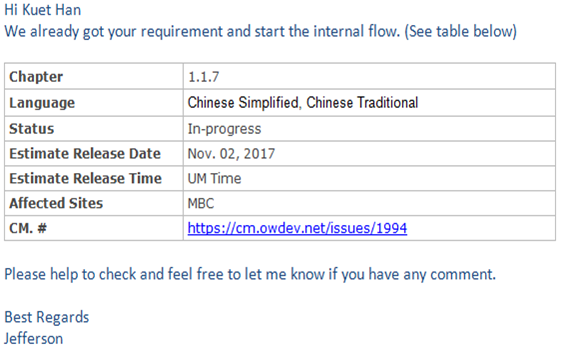
TW group replies the OPS/NSD mail when the requirement and release date are confirmed.
- Note: Go-Live Date Change
- If the go-live date must be changed, remember to send the change request to OPS/NSD group.
- UAT
Arrange the UI/UX and Front-end group to build the UAT environment.
- UI/UX team provides the SVN No.
- Front-end team provides the UAT environment.
Examine the content in UAT environment, to see if there is omission. If urgent, verify the content directly in production environment.
- Go-Live
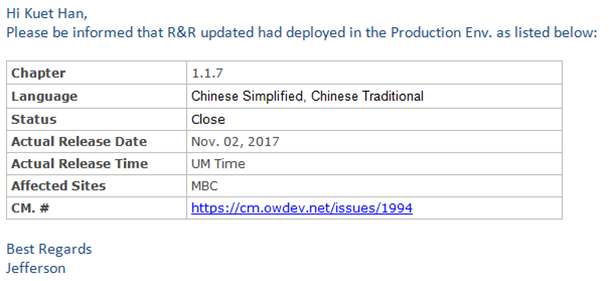
- After go-live, send notification mail to OPS/NSD group. (see example below)